
Synthetic Installer
Settings
Your account, your products and help, in one place.
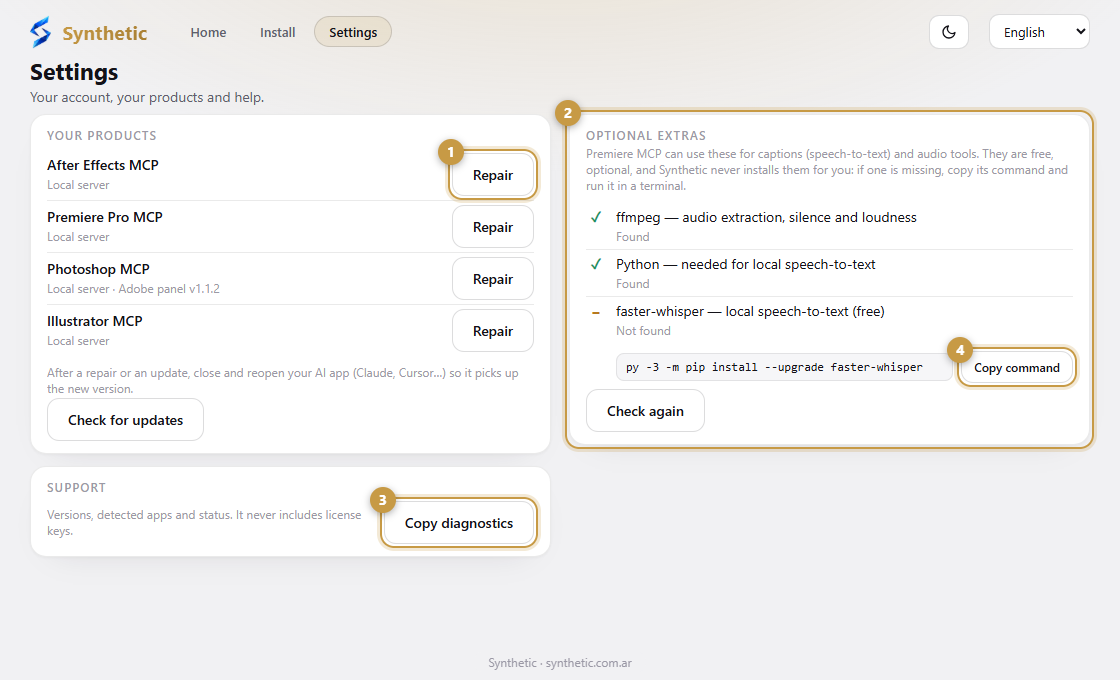
- 1Repair reinstalls only that product, only in the AI apps that already have it.
- 2Optional extras for Premiere MCP: ffmpeg, Python and faster-whisper.
- 3Copy diagnostics copies a report for support. It never includes license keys.
- 4Copy command copies the exact install command for your system.
Account
Shows who is signed in. Sign out removes the saved session from this PC; the tools you installed keep working.
Repair
If a tool stops responding, press Repair on its card. It reinstalls only that product, and only in the AI apps that already have it, leaving everything else alone. Then restart your AI app.
Copy diagnostics
Copy diagnostics builds a short report (versions, detected apps, what is installed, update status) and copies it. Paste it into a support ticket. It never includes license keys or personal folders, and nothing is sent anywhere until you paste it yourself.
Optional extras
The captions (speech-to-text) and audio tools of Premiere MCP can use ffmpeg, Python and faster-whisper. They are free and optional, and Synthetic never installs them for you. The Settings screen shows which ones this computer has and, for the missing ones, the exact command for your system (for example brew install ffmpeg on a Mac, or winget install on Windows) with a button to copy it.
Language and theme
Choose the language (English, Español, Português, Français, Deutsch or 日本語) and the light or dark theme from the top bar. Show details reveals the technical paths when you need them.