
Synthetic Installer
Updates & Home
Home is where the app rests. It shows what is installed and whether anything needs an update.
The Home screen
When something is already installed, the app opens on Home: every product with its versions, and a status card that says either that everything is up to date (with the time of the last check) or how many updates are available. It checks again quietly every 30 minutes while it stays open, and Check again does it on demand.
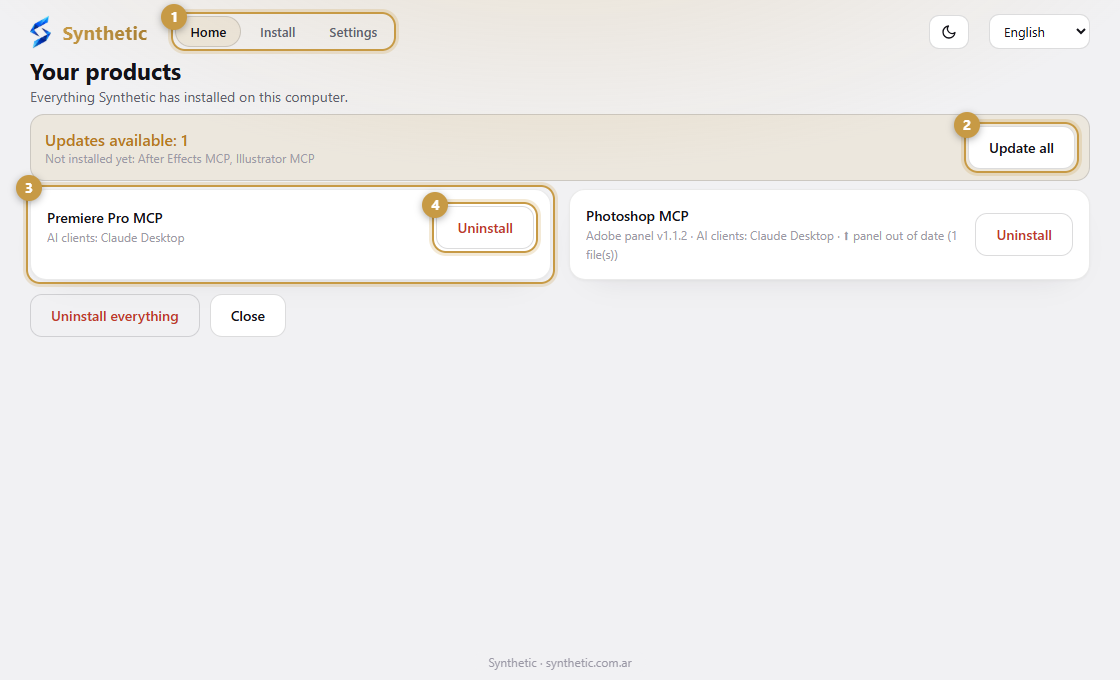
- 1The tabs: Home, Install and Settings.
- 2The status card. It says whether everything is up to date; if not, Update all updates only what you already have.
- 3One card for every installed product, with its versions.
- 4Uninstall removes only that product, and always shows a preview first.
Update all
Update all refreshes only what you already have. It never adds a product or an AI app you did not install, and there are no tick boxes to choose.
The tool updates when your AI app starts
The MCP server (the part your AI app runs) looks for a new version every time your AI app starts it, and updates itself. Home lists it as an available update; close and reopen your AI app and it updates by itself.
New purchases
Bought another tool? Press Check again (or just open the app again) and it appears under Not installed yet, with an Install button.